
Use PlayPeach Freeform when you need control over length and resolution. In our signed-in check, an eight-second draft ranged from 200 Peaches at 480p to 800 at 1080p. A preset saves setup time if its fixed duration fits. Check the editor quote, credit expiry and media retention before you commit.
Choose a video mode
Start with a preset when the scene is the reason you’re there. Check its duration and price first. PlayPeach’s terms describe both as fixed for presets, so choose a scene whose length already suits the job. If you need a specific run time or want to control the prompt, move to Freeform.
Open Create your own scene when timing matters. Select Video, then open Options to price the draft before adding a reference. An empty draft was enough to compare costs in our signed-in Chrome check. PlayPeach describes Freeform as a workflow with an image, a prompt and optional reference footage. PlayPeach terms
We opened Add media and saw All, Uploads, Generated and Character tabs. If you already have a reference in your account, check the relevant tab before uploading a duplicate. We did not select or upload anything. PlayPeach requires clearly adult subjects and the rights and permission for the intended use of a real person’s image. PlayPeach safety rules
Price your draft
Start at the length you need, then compare the three price labels under Quality. At eight seconds and 720p, the breakdown showed 200 base Peaches, calculated at 25 per second, then doubled for quality. We pressed the left arrow on the duration slider once. The draft dropped to seven seconds and the quote to 350. Restoring eight seconds brought it back to 400.
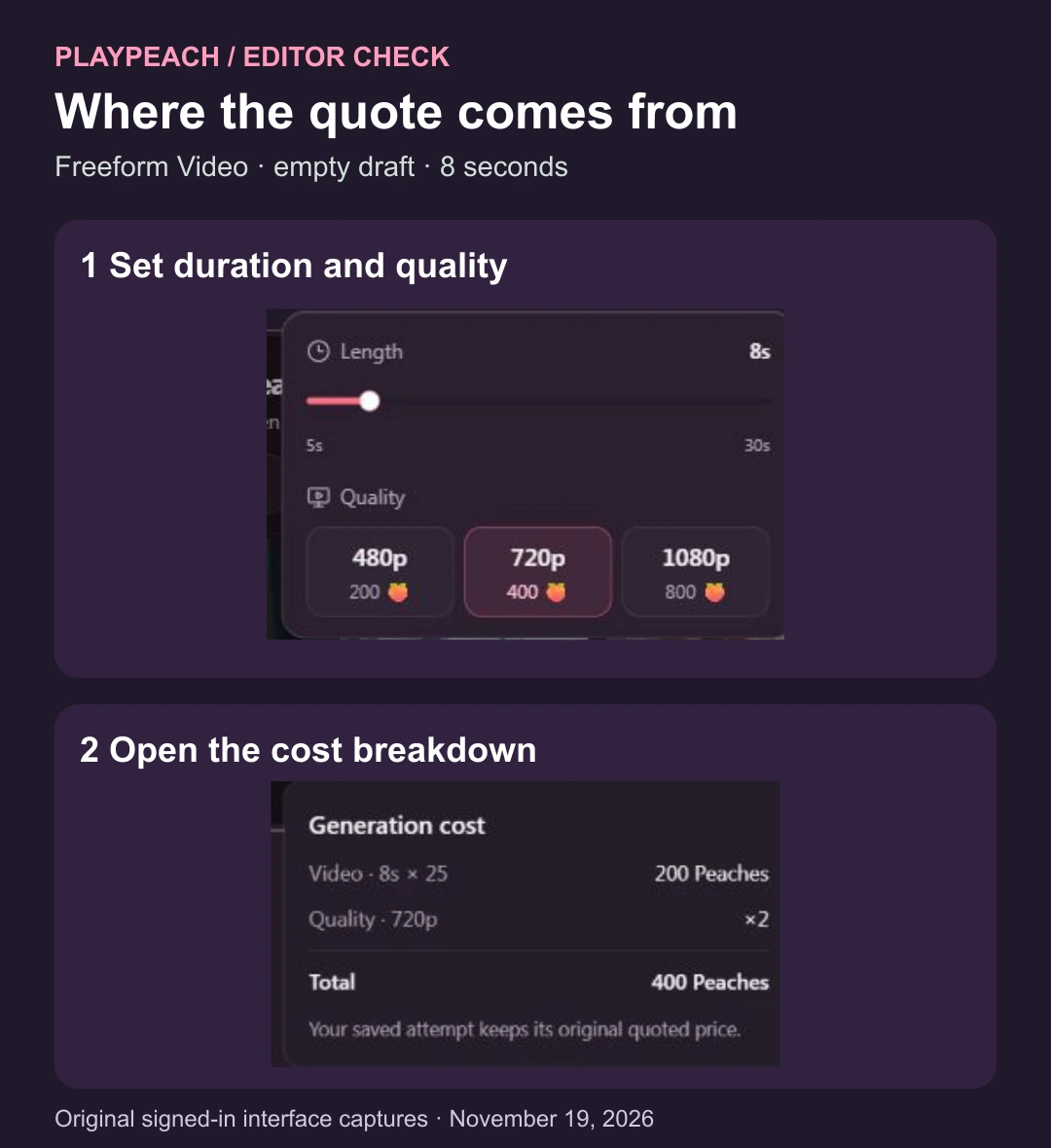
Then we used Home and End on the duration slider. It reached five and 30 seconds in that setup. We recorded the price labels next to the resolution choices at both ends and at eight seconds.
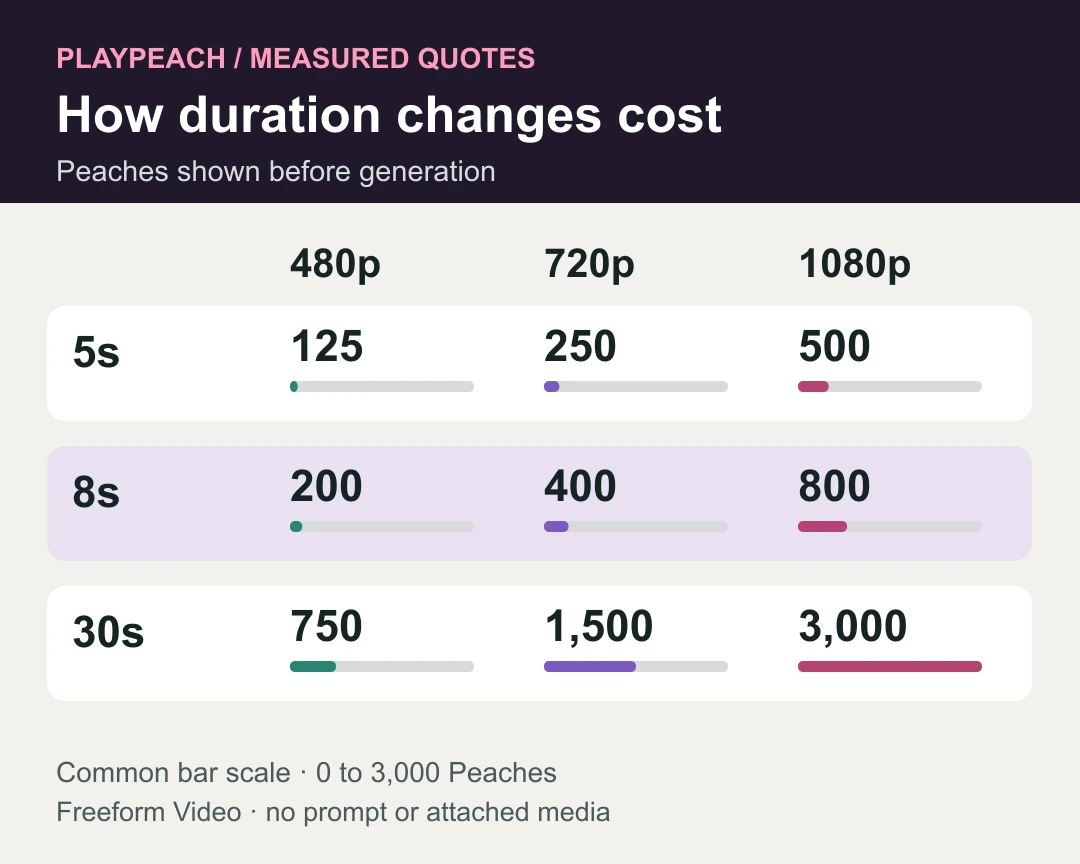
If you need the full eight seconds, compare resolution before trimming. Cutting from eight to seven seconds at 720p reduced the quote by 50 Peaches. Keeping eight seconds at 480p was 200 Peaches below the 720p quote. An 800-Peach budget covers two eight-second attempts at 720p, one at 1080p, or one 30-second preview pass at 480p on those quotes. Decide whether the first pass needs to answer a timing question or deliver the final resolution.
The terms cite 200 Peaches for an eight-second video with an image and give a Freeform rate of 25 per output second. In our empty draft, 200 matched 480p, while the 720p breakdown explicitly doubled that base. The terms also list 110 Peaches per second for optional reference footage up to five seconds. Use the live total for your actual media and settings, because our empty-draft test did not measure how that charge combines with resolution. Generate stayed disabled, so output quality, turnaround and final balance deductions remain unverified. PlayPeach terms
Compare payment options
The editor quotes Peaches, the credits used for jobs. Telegram checkout quotes Stars, which have their own cash purchase cost. Evaluate a plan using the amount charged today and the credits you can use before they expire. For example, if you make videos in occasional batches, an annual plan that issues credits every month can give you fewer usable credits on production day than the yearly total suggests.
| Payment option described in the terms | When payment renews | How the credits arrive and expire |
|---|---|---|
| Monthly Telegram Stars | Renews every 30 days until canceled. | Each monthly allocation lasts 60 days. |
| Annual Telegram Stars | One payment upfront with no automatic renewal. | Twelve monthly allocations. Each expires when the next arrives, with the final one expiring at the end of the year. |
| Direct card, where offered | Renews monthly or yearly as shown at checkout. Annual payment is due in full upfront. | Monthly refills last through the following billing month. The annual plan credits the year’s allocation upfront, valid for 13 months from the start of the paid year. |
The provider’s terms also describe one-time Telegram top-ups for active paid subscribers. Those credits expire 60 days after payment confirmation. Check the invoice amount, credit allocation, expiry and renewal together. An advertised USD equivalent can differ from the cost of buying Stars, which can depend on region, taxes and purchase method. We did not complete checkout or verify which options every account can buy. PlayPeach terms
Check a job before retrying
PlayPeach says a submitted job runs in the background, so you can close the tab and come back to Library to check progress. A second submission starts a separate job. If the first entry is still processing, its Peaches can stay reserved while the outcome is pending.
- Open the existing job in Library and read its latest status.
- For a confirmed failure or eligible cancellation, check the balance for the credit return described in the FAQ. For a completed clip, open the saved result before deciding to pay for another attempt.
- For a stuck job or a balance that looks wrong, send support the job ID, what happened and your browser or device. For payment problems, use the receipt or order ID. Leave private photos, passwords and payment details out of the message.
A return of Peaches is a balance adjustment for the job. Payment refunds follow a separate process. PlayPeach FAQ · Support
Remove uploads and finished videos
Check two places if you want to clear a project. PlayPeach says saved and unsaved references have no automatic expiry. The policy says uploads and outputs are private to your account, with access for authorized staff and service providers when needed to run the service, handle support or respond to safety issues.
- Remove the input. Go to Saved photos for saved references. Open Other uploads there for temporary references you did not save.
- Remove the output. Open Library and delete the generated clips you no longer want stored. Removing a reference leaves previous videos in the Library. Download anything you intend to keep before deleting it.
If you want to close the account, read the Account options carefully. The privacy policy says deactivation stops access, subscriptions and active jobs while keeping your account and media. Permanent deletion is a separate account action. Billing and safety records can still be retained for specified purposes. We reviewed these documented paths without testing account or file deletion. PlayPeach privacy policy · FAQ
PlayPeach FAQ
Can I count on a free generation?
Check your account’s actual balance or offer. PlayPeach’s privacy policy says signup-country estimates help determine eligibility for free offers. We did not test an offer or redeem credits. PlayPeach privacy policy
Does a Telegram payment require Telegram Premium?
The terms say Premium is unnecessary. Buy any Stars you need, then pay the PlayPeach invoice from your signed-in account. Buying Stars by itself does not add Peaches. PlayPeach says it links the transaction to the Telegram user ID and the PlayPeach account. PlayPeach terms · Privacy policy
Do I have to sign in to report a consent issue?
PlayPeach lists a public report form for consent, privacy and safety concerns. Use that route for an urgent removal request. For a normal question about your own job or invoice, use Support. PlayPeach FAQ · Report form
Start with the cheapest empty draft that fits your brief. Check its quote against the credits you can use by the expiry date, and confirm you know where to remove the reference and result before you upload.